

Recently, there’s been a lot of news about ChatGPT changes that matter for the SEO and AEO space. The GPT-5.6 model seems to have shifted the query fan-outs – more brand domains cited, less Reddit, brands showing up in the hidden queries, and more.
So I ran a bunch of commercial prompts myself to see the actual picture. Here’s what I found, and the patterns worth paying attention to.
This article also shows you a detailed, recently verified way to find ChatGPT query fan-outs.
In a nutshell
👉 A query fan-out is the set of background searches ChatGPT runs instead of searching your prompt as-is. One question becomes several queries (about 2.1 on average), and those queries decide which pages even get a chance to be cited and what information points are important for the search.
👉 To find ChatGPT query fan-outs manually, open the chat in Chrome and use DevTools: Inspect → Network, filter the requests by “conversation”, open the largest conversation request, click the Response tab, and search inside it for fast| – every match is a hidden search query ChatGPT ran to build its answer.
👉 Here are the most popular patterns in ChatGPT query fan-outs for commercial (“best…” and similar) prompts, based on my tests: the current year appended to your query (“best insurance providers” → “UK insurance providers car home travel health life best 2026”), a brand shortlist written into the search (“best ai automation tools” → “best AI automation tools 2026 Zapier Make n8n Lindy Gumloop Relevance AI”), your location pulled from your account (“recommend me seo consultant” → “best SEO consultants UK fractional SEO consultant 2026”), and modifiers you never typed (“find me an experienced plumber” → “plumbers with high ratings, emergency plumbers”). Those are the angles your page has to cover, or the model pulls them from a competitor.
👉 What to do about it: keep the current year and a real refresh on your key pages (ideally every three to six months), earn your way into the brand shortlist with mentions and earn positive reviews from your customers, name your location on your website, cover the specialty subtopics that actually apply to you, and maintain GBP if you’re a local business.
What a ChatGPT query fan-out actually is
A ChatGPT query fan-out is the set of search queries ChatGPT writes from your single prompt and runs in parallel against search indexes, instead of searching your exact words, when it decides the answer needs current information. It rewrites your question into several of its own queries with additional modifiers and blends the results into one answer.
So a prompt like “What are the best SEO tools for enterprise websites?” might internally become:
- best enterprise SEO tools 2026
- enterprise SEO software comparison
- enterprise SEO software for ecommerce
- etc
That set of hidden queries is the fan-out. Your page can only get retrieved (and then maybe cited) if it’s a strong result for at least one of those queries – ideally several.
Here’s another useful distinction to keep in mind: retrieved means ChatGPT fetched your page while running fan-outs; cited means your page made it into the visible answer. Lily Ray’s August 2026 research roundup shows these are moving in opposite directions – ChatGPT is retrieving more pages per answer while citing fewer domains.
What patterns I’m seeing in commercial fan-outs right now
I ran a batch of commercial prompts through ChatGPT last week to see what the fan-outs actually look like today – mostly “best…”, “recommend me…” and “find…” style prompts, run manually with my location set to London, after reading Suganthan Mohanadasan’s recent articles (this and this).
| Pattern | Example from my tests | What to do about it |
|---|---|---|
| The year gets appended, typed or not | “best insurance providers” → “UK insurance providers car home travel health life best 2026” | Carry 2026 on your key pages, and give them a real refresh every three to six months |
| A brand shortlist gets written in, often with “official” attached | “best ai automation tools” → “best AI automation tools 2026 Zapier Make n8n Lindy Gumloop Relevance AI”, then a probe for each brand’s own site | Track whether your brand is on the shortlist; a spot there is a strong signal, though not a guaranteed citation |
| Location is pulled from your account, even with no place named | “recommend me seo consultant” → “best SEO consultants UK fractional SEO consultant 2026” | Name your location on the relevant pages, and remember your extractions only ever show your own market |
| Modifiers you never typed narrow the ask into sub-intents | “find me an experienced plumber” → “plumbers with high ratings”, “emergency plumbers” | Cover the specialty subtopics that actually apply to what you do |
One caveat before you read too much into any single run: fan-outs change between runs, and the format itself keeps shifting. Run each prompt a few times and only trust the patterns that repeat. The three checks below are where you turn these patterns into on-page decisions.
How to find query fan-outs in Chrome DevTools
This is my manual method. It works in Chrome with a regular ChatGPT account, takes a couple of minutes, and needs no tools.
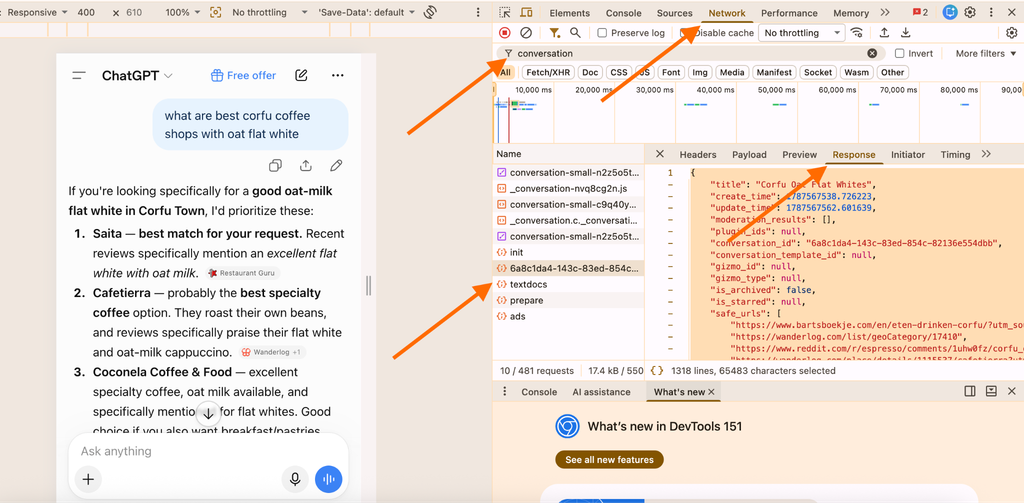
- Open ChatGPT and DevTools
Open the ChatGPT conversation→ Inspect → and select the Network tab.
- Start recording requests
At the top of the Network panel, make sure the red recording dot is on, clear the existing requests with the clear (🚫) button, then press Reload.
- Write your prompt
Ask ChatGPT something relevant to your category, for example:
What are the best SEO tools for enterprise websites?
Use a query your actual buyers would ask, and wait until ChatGPT has completely finished responding. If the prompt doesn’t trigger a web search (no sources, no “searching” indicator), there’s no fan-out to find – the model answered from training data.
- Filter for “conversation”
In the Network filter box, type conversation. You’ll see several requests, but don’t just click the first one. You want the large conversation request – usually the one with a noticeably bigger Size than the others. That’s the one carrying the full conversation data.
- Open the Response tab
Click the big conversation request. You’ll see tabs like Headers, Payload, etc. Click Response.
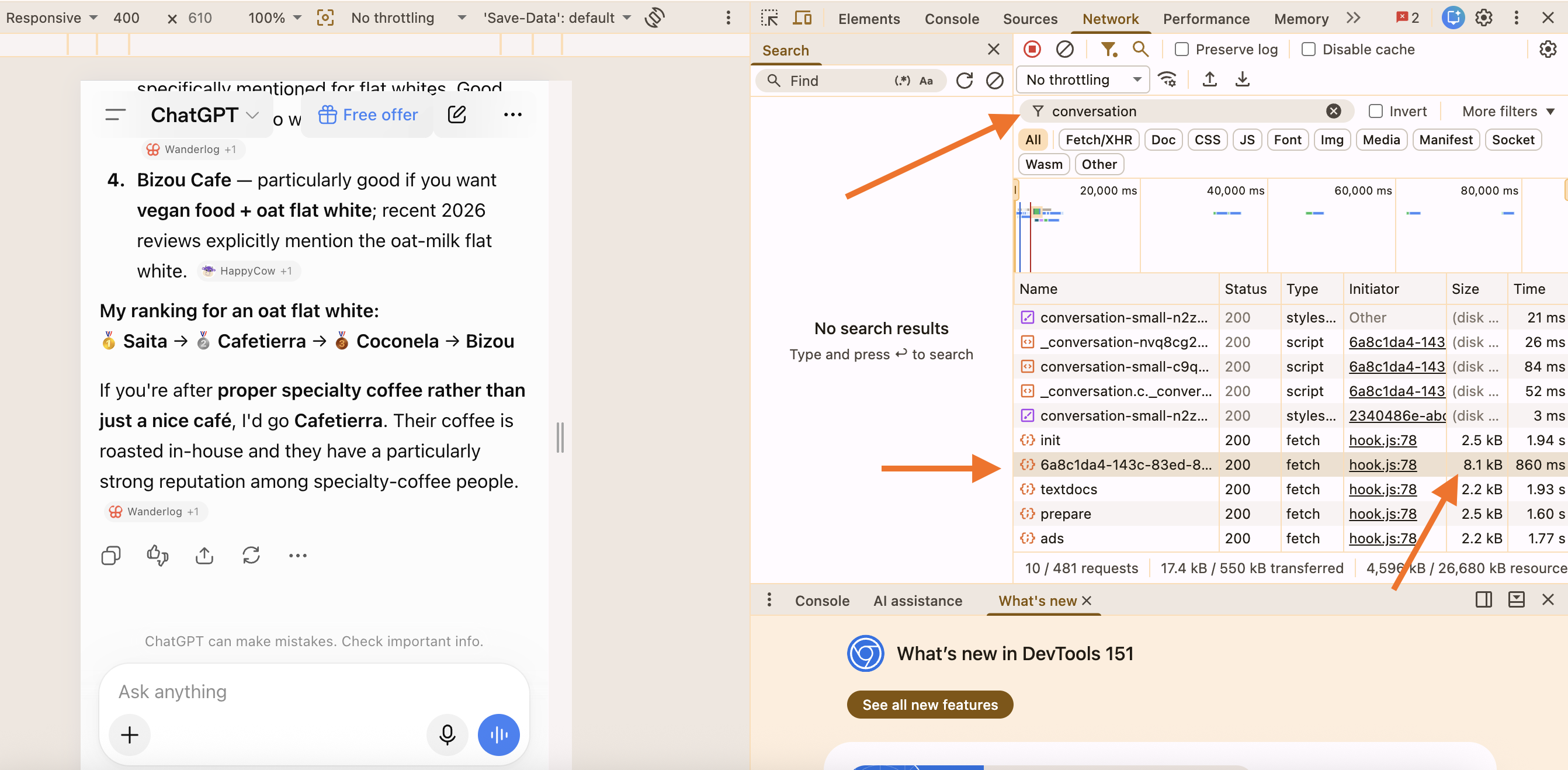
- Search inside the Response for
fast|
Click inside the Response pane and search for:
fast|
- Read the fan-out queries
You’ll see strings resembling this – here’s a real capture from my prompt “recommend me seo tool”:
fast|best SEO tools 2026 Semrush Ahrefs SE Ranking Screaming Frog Surfer SEO
fast|best AI SEO tools 2026 AI search visibility SEO tools
The whole line is readable: fast is the call type (a web search), then the query, then sometimes a number and a domain. The number appears to be a freshness window in days, and the domain slot means the search only looks at that one site – both matter for the checks below. Local prompts also fire business| lines (a places lookup) alongside the fast ones, like business|Greece|best hotels;luxury hotels;boutique hotels from “give me hotel suggestions in greece”.
One important habit: run the same prompt a few times, ideally in fresh chats. Fan-outs are generated dynamically, so they change between runs, between accounts, and between model updates. The queries that keep repeating across runs are the signal; a query that appears once is noise.
If the Response panel has no “fast|”, try to reload the conversation and check one more time. Also, worth mentioning: I don’t see this data in the non-login chat.
Moreover, you should know that there can be some information that is impacted by personalization in your account.
Now, let’s move to what you can do with the queries fan-out.
What to do with the fan-out queries once you have them
Now that you have a clear way to extract the information, here is what you should check.
1. Check the words ChatGPT added to your query and use them for your content
Compare each fan-out query against the original prompt and highlight what’s new. These additions tell you which subtopics and qualifiers the model considers part of answering the question – which is a very direct hint about what your page should cover.
For example, here is the initial prompt and the query fan-out.
- “best ai visibility tools” →
best AI visibility tools ChatGPT AI Overviews brand visibility SEO 2026In this case, your content about your AI visibility tool or the listicle with best AI visibility tools should definitely mention tracking ChatGPT, AI Overviews, and how AI visibility software also helps with overall SEO work.
Here’s another example: “recommend me seo consultant” → independent SEO consultant London technical SaaS SEO consultant
In this case, you should mention your technical SEO services, SaaS expertise and your location to be the most relevant.
Same with these examples:
- find me an experienced plumber” →
plumbers with high ratings;emergency plumbers - best insurance providers” →
UK insurance providers car home travel health life best 2026
2. Check for brands in the queries
If fan-out queries contain brand names, check whether yours is one of them, and note which competitors appear. This matters because it shows your already strong sign of association of LLM with that topic. It also shows that the system is looking for these brands’ websites directly (also including “official” in the query).
For example:
- “best ai automation tools” →
best AI automation tools 2026 Zapier Make n8n Lindy Gumloop Relevance AI;n8n AI automation official AI agents,Make AI agents automation official,Zapier AI automation agents official - “recommend me saas seo agency” →
SaaS SEO agency Grow and Convert Skale Powered by Search SimpleTiger
Ideally, you want to track this over time: your brand should consistently appear both in the fan-out queries and in the final answer.
Also, in the response data, there can be the domain slot at the end of the line. When ChatGPT targets a site directly, the domain sits in that last field, filled from the model’s memory of which domain belongs to which brand.
3. Check for freshness signals
Look at the third field in the fast| lines – the number. It appears to be a recency window in days, matched to how fast the answer goes stale. In Suganthan’s August 2026 captures, a stock price got a 2-day window, football results 7, earnings guidance 90 – and every brand probe on his commercial questions ran on a 30-day window. No official spec confirms the days reading, so hold it loosely, but the pattern across query types is consistent.
If it holds, the implication for commercial pages is direct: a pricing or comparison page that hasn’t changed in a month is competing from outside the default window on exactly the queries where brands get compared. Peec’s earlier study found the same instinct in the query text itself – ChatGPT adds the current year to its fan-outs in 5.44% of prompts.
So read the window your category runs on, and update the pages that answer buying questions inside that cycle – with real changes and visible dates, not a bumped timestamp. A page last touched two years ago can be a perfectly good page and still lose retrieval to a mediocre one dated last month.
Local businesses: optimize your GBP and mention your location on your website
ChatGPT adds your location for some prompts even when the prompt names no place – especially if it’s a location-based intent.
For example:
- “recommend me seo consultant” came back as
best SEO consultants UK fractional SEO consultant 2026 - “find me “affordable home cleaning services” as
affordable home cleaning services London prices - “find me experienced plumber” fires
business|user|experienced plumbers;plumbers with high ratings;emergency plumbers
This means that if your business is location-specific,
1) Make sure to mention your location on the website (the first example with an SEO consultant) and
2) If you’re a local business, maintain your GBP (Google Business Profile), which is the case with the cleaning services and plumber queries. In the answers, I could often spot ChatGPT pulling GBP content in directly – the utm_campaign=gmb-website parameter shows up in some of the links it surfaces.
For local queries, ChatGPT also uses GBP reviews a lot, which means they do matter, so keep earning them.
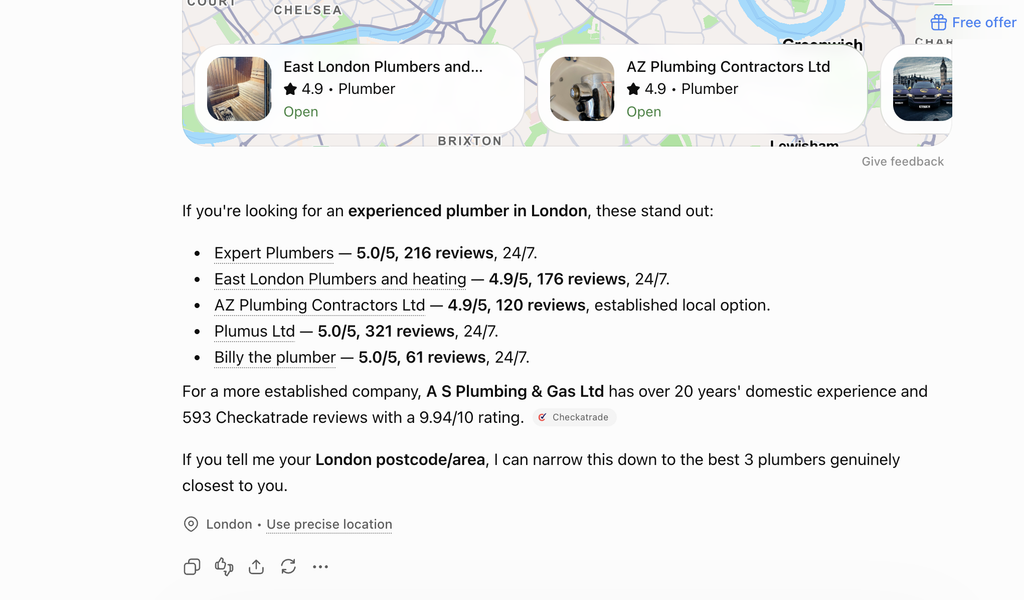
And reviews are important overall to get recommended by ChatGPT and chosen by users.
Frequently asked questions
How many fan-out queries does ChatGPT run per prompt?
ChatGPT runs about two fan-out queries per prompt on average – it’s 2.1, based on the older data from Peec AI (April 2026). But the range is wide – simple prompts can trigger one search, while reasoning models on complex commercial prompts can fire ten or more.
Do fan-out queries change every time you run a prompt?
Fan-out queries are generated fresh for each run, so yes – the same prompt produces different fan-outs across sessions, accounts, and model versions. That’s why one extraction isn’t reliable data: run the prompt several times and treat the recurring queries as the real pattern.
Can I see query fan-outs in Google AI Mode?
Perplexity shows its sub-queries natively – the search steps above the answer list what it ran, no DevTools needed. Google AI Mode uses the same fan-out concept but masks the sub-queries, so the closest you get is reverse-engineering them from the cited links. The extraction method in this article is ChatGPT-specific.
Are query fan-out generators accurate?
Query fan-out generators simulate what a fan-out would probably look like by asking a model (often Gemini) to expand your keyword – they don’t show real queries from a live conversation. They’re usable for subtopic brainstorming, but for auditing what ChatGPT actually searches, extract the real fan-outs from DevTools.
