

What are the best MCPs to use for SEO in 2026? [Quick answer]
👉 The SEO MCPs I rely on most and can recommend to others are Google Search Console, GA4, SE Ranking, and Ahrefs for the actual SEO data (traffic, keywords, backlinks); Screaming Frog for technical SEO, Firecrawl for scraping website content, and Apify for LinkedIn scraping. On top of that, I connect Gmail, Google Calendar, Google Drive, Slack, Notion, Linear, and Claude in Chrome so Claude fits into my everyday routine.
Over the past few months, Claude has changed my day-to-day work and become kind of my coworker and the tool I work with the most as a marketing professional.
ChatGPT and Claude have been around and actively used for a long time. But everything seemed to change when Anthropic released Claude Cowork with the ability to create Skills (your documented workflows) and the ease of connecting MCPs.
And MCPs are what allow us to get marketing as well as tons of other data right into Claude and build workflows using it. And this has become so accessible that it has really changed how we work and how we do SEO or other tasks.
And this is why we’re now also talking about automations not as some technical, only-for-nerds thing, but as accessible ways for everyone to optimize the work they do.
Let’s start with a quick definition, because not everyone might be so familiar with the term.
What is an MCP server?
MCP (Model Context Protocol) is the standard that lets Claude, ChatGPT, or Gemini talk to an external tool — pull data from it, and sometimes write back to it.
MCP connectors is a way to pass data from SEO, marketing, customer, or other tools directly into the chat, so you can just ask questions about this data without opening the tools. So instead of copy-pasting data or exporting data and then giving it to Claude for analysis (the workflow before Claude Cowork/Code and MCPs), you just connect the needed MCP and ask Claude to do the work you need. This can be getting keyword ideas from SE Ranking or Ahrefs, clicks and top pages from Google Search Console, traffic by channel from GA4, or email or Slack updates in right into chat.
Everything is done by prompting. For example, you connect GSC and type, “Compare the last 28 days to the previous period for the blog using GSC and flag the queries that dropped in the US and UK,” and Claude gives you the answer.
That’s the whole point — the connector removes the manual step between pulling the data and the analysis done by AI and your guidance.
Here are the Claude MCP connectors for SEO I reach for most, and the specific workflows I run on each one. If you’re trying to figure out which connectors are worth setting up first, start here.
Now, I’ll share my list of Claude MCPs that I use the most and can recommend to connect in 2026.
The MCPs I use, at a glance
Core SEO connectors
- Google Search Console – period-over-period clicks from Google organic search, plus page and query performance
- GA4 – traffic by channel share, traffic from AI engines, and engagement data
- SE Ranking – keyword rankings, AI visibility data, keyword research, and SERP analysis
- Ahrefs – domain research, backlinks, and DR benchmarking against competitors
- Screaming Frog – website crawling for technical SEO issues like 404s, heading problems, and more
Website scraping
- Firecrawl – clean website content extraction for on-page and competitor analysis
- Apify – competitor monitoring, especially LinkedIn scraping
Day-to-day management
- Gmail – email digests and action items pulled into Claude or Slack
- Google Calendar – my daily and weekly plans
- Google Drive – creating new docs
- Slack – channel recaps and turning discussion into tasks
- Notion – my knowledge base and documentation
- Linear – create and manage new tickets without leaving the chat
- Claude in Chrome – grab data straight from a dashboard in the browser
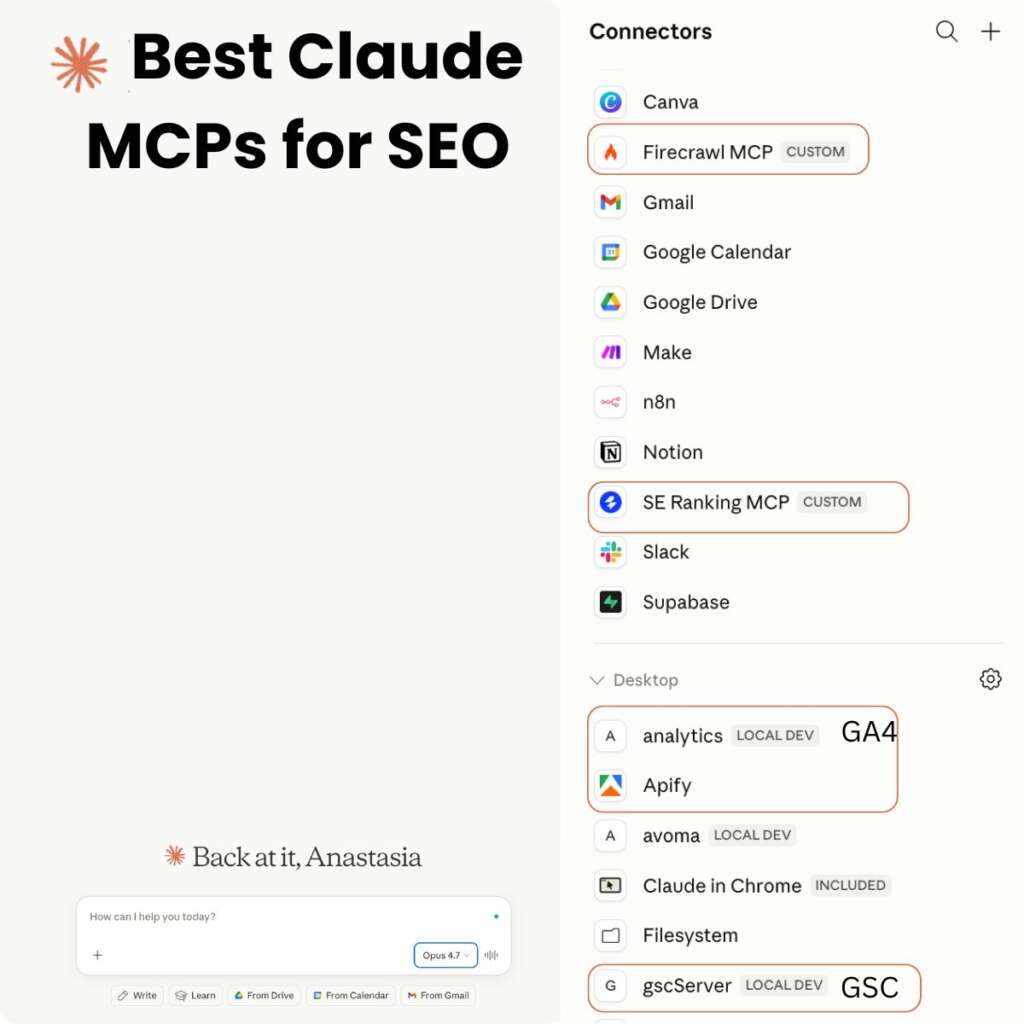
Core SEO MCP servers
Let’s start with the core must-use free tools that give you the most accurate SEO data.
1. Google Search Console
This is my most-used connector! GSC is what I use for almost all SEO analysis or checks.
What I actually run on it:
Period-over-period comparisons to see the overall performance.
Then I go to the country and page level to understand what pages are bringing organic growth and what should be reviewed and optimized.
Query-to-page relevance checks — pulling rising queries and seeing if there are new content ideas within those queries (if the page currently ranking for them is not the right one).
Quick “which queries are we ranking 5–15 for” pulls to find the optimization opportunities that don’t need a brand-new page, just a better one.
Optimizing content & adding relevant internal linking using the query data.
And much more.
Because Claude reads GSC directly, I can ask follow-up questions and add other data sources to go further.
And as for GSC, I tried and used two MCPs by the SEO community – Suganthan Mohanadasan and Amin Foroutan – both work.
The easiest way to connect GSC is probably to follow this video guide by Amin Foroutan.
2. GA4
GSC gives you the granular SEO data, while GA4 gives you the context – what your traffic channels are, details on each, landing pages and user engagement, etc.
I use the GA4 connector mostly for analysis per organic source (Google, Bing, etc.) and traffic from AI engines – overall, by country, by landing page. I also see if users are engaging with the pages.
So, there are tons of useful data – the only thing is that the setup is not the easiest one.
So, GA has an official MCP; here is the documentation.
Briefly, here are the steps:
In console.cloud.google.com, you create a project and enable the Google Analytics API. You create a key and give Claude access to that key. You also ask Claude for additional installations if needed and add the GA4 snippet into the Claude config JSON.
I’m going to create a separate guide on this topic as I haven’t seen really easy ones to follow.
3. SE Ranking
SE Ranking is an SEO tool that gives you accurate rankings & AI visibility data as well as SERP analysis, keyword & domain data. So, I most often use it for getting rankings reports in Google and AI visibility, keyword data for content-related tasks or research, as well as SERP data for cluster analysis.
For example, I have a scheduled SEO performance report with rankings (top-10 movers for target keywords, top 3/top 10 buckets, shifts across the projects combined with AI visibility data like brand in the top 3 mentions per AI engine). I add GSC and GA4 data on top.
The setup is easy: you just add a custom connector (a link) and insert your API key.
4. Ahrefs
Ahrefs is also an SEO tool that is known for its strong backlink data. I can use it for getting DR as a benchmark metric, domain analysis, and backlink reports. It’s great to have both tools if you have the budget, as SE Ranking is best for rankings, while Ahrefs is a top tool for backlinks.
One of the tasks I have with Ahrefs is getting a scheduled weekly report by new top backlinks with DR, traffic and backlink details (anchor) sorted by DR.
You can find Ahrefs in the Connectors tab and just click on it.
5. Screaming Frog
The newest addition to my stack — the official Screaming Frog MCP just arrived, and a site crawler is exactly the kind of data I always wanted Claude to read directly.
With Screaming Frog, I can have Claude crawl a section and surface the issues that matter — broken internal links, redirect chains, missing or duplicate titles, thin pages, orphaned URLs. Pair the crawl with GSC data and you can prioritise: don’t just list every technical issue, fix the ones on pages that actually earn clicks first.
You can also get data by URL, which is useful for deep on-page analysis.
For the setup, you need to have the latest version, download the extension and add it to Claude desktop Settings -> Extensions.
Website scraping connectors
6. Firecrawl
Firecrawl is my website-content scraper. When I need the actual text of a page — a competitor article, a SERP result — Firecrawl pulls clean, readable content that Claude can analyse straight away. I use it constantly, mostly for on-page analysis and content optimization when I need full page content, and also for content audits when I need additional data like publication date.
If you use it for on-page analysis or briefs occasionally, the free tier should be fine. But if you run content audits often or you need to scrape page content every day, you would probably need a paid version.
7. Apify
Apify is an additional scraper on top of Firecrawl. My main use case is competitor monitoring — scraping LinkedIn company pages and key employee profiles to see what competitors are publishing and promoting.
I run it on a schedule daily, and the output feeds a daily competitor digest. It’s flexible enough for plenty of other scraping jobs too, but the LinkedIn monitoring is what earns its place for me.
The free tier is enough for me.
Day-to-day management connectors
SEO isn’t only keywords and crawls — if you work in-house with a bigger team, a lot of your week is communication and coordination. These connectors are why Claude replaced a handful of separate tabs.
They are all very easy to connect – do it from the ‘Connectors’ tab.
8. Gmail, Google Calendar & Drive
The Google trio keeps Claude aware of my actual day. It can pull context from email threads, check what’s on my calendar, and read or reference docs in Drive — so when I ask for a recap or a draft, it’s working from real context, not a blank slate.
I would really love to see a Google Sheets connector as this is my main tool for work, but unfortunately, it’s not there yet (only Excel).
9. Slack
This is the connector that surprised me with how much it saves. I use it to recap my day or week from the channels that matter, pull out action items I’d otherwise miss, turn messages into Linear tasks.
I have separate channels for automated reports sent by Claude, like the SEO performance report or competitor monitoring, so as not to spam regular chats.
10. Notion
Notion is my knowledge base and database. Claude reads from it for context — brand guidelines, processes, project notes — and I use it as the source of truth behind a lot of my skills. When a workflow needs documented rules to follow, they live in Notion and Claude pulls them in.
I can also easily push something to Notion – like a content plan or list of pages with additional data. The connection works really well.
11. Linear
Linear is my task manager, and the connector lets Claude create and update issues directly. Most of my tasks now get created from inside a conversation — I spot something in Slack or just have the plan based on the analysis, and it becomes a properly formatted Linear issue with the right context attached, instead of a vague note I write to myself.
12. Claude in Chrome
Claude in Chrome is for the quick, in-the-moment jobs — pulling data from a tab I already have open, reading a page behind a login that a scraper can’t reach, grabbing something off a dashboard. It’s not where I do heavy analysis, but it closes the gap for all the little “just get me what’s on this screen” tasks.
For example, it takes some data from my internal dashboards and gives me the calculations.
Or you can get data from LinkedIn.
And other help you might need in Chrome, where you need to click filters and copy some things.
S
Where to start
Now you have a list of the best SEO MCPs that are very useful in 2026 for your daily tasks and automations. And here comes the second part that makes Claude the top tool for the industry – Skills. Read my article on my favorite Claude Skills.
Then, start connecting MCPs. Start with the ones that are very easy to connect. These are Gmail and Slack for daily operations. Then, bring tools for handling different SEO tasks: SE Ranking or Ahrefs for keyword research, competitive or backlink analysis. Bring in Screaming Frog for technical SEO audits.
The most useful first-party data sources are GSC and GA4, but they are a little trickier to connect. But they are definitely a must-have, so it’s worth spending the extra time.
Also, go to the Directory of connectors (Customize → Connectors → ‘Add’ button → Browse connectors) and check what other MCPs you might need or where you already have a subscription.

1 Comment
Rubel Maksudul
Helpful Breakdown 👏
I just read the full article, without skipping a single word.
Thanks Anastasia 🙂