

Over the past few months, Claude has quietly turned into my main working environment. Not a chatbot I open when I’m stuck — the place where a big chunk of my SEO work actually happens.
Two things made that shift possible: skills and MCP connectors. Skills are my documented workflows — the repeatable steps I’d otherwise explain to a junior every time. MCP connectors are the data sources Claude plugs into, so instead of me copy-pasting exports between tabs, Claude reads the numbers directly from Google Search Console, GA4, SE Ranking, or Ahrefs and works on them.
Put those together and Claude stops being a writing assistant that can just come up with numbers and starts behaving like a teammate who already has access to my whole stack.
Here are the Claude MCP connectors for SEO I reach for most, and the specific workflows I run on each one. If you’re trying to figure out which connectors are worth setting up first, start here.
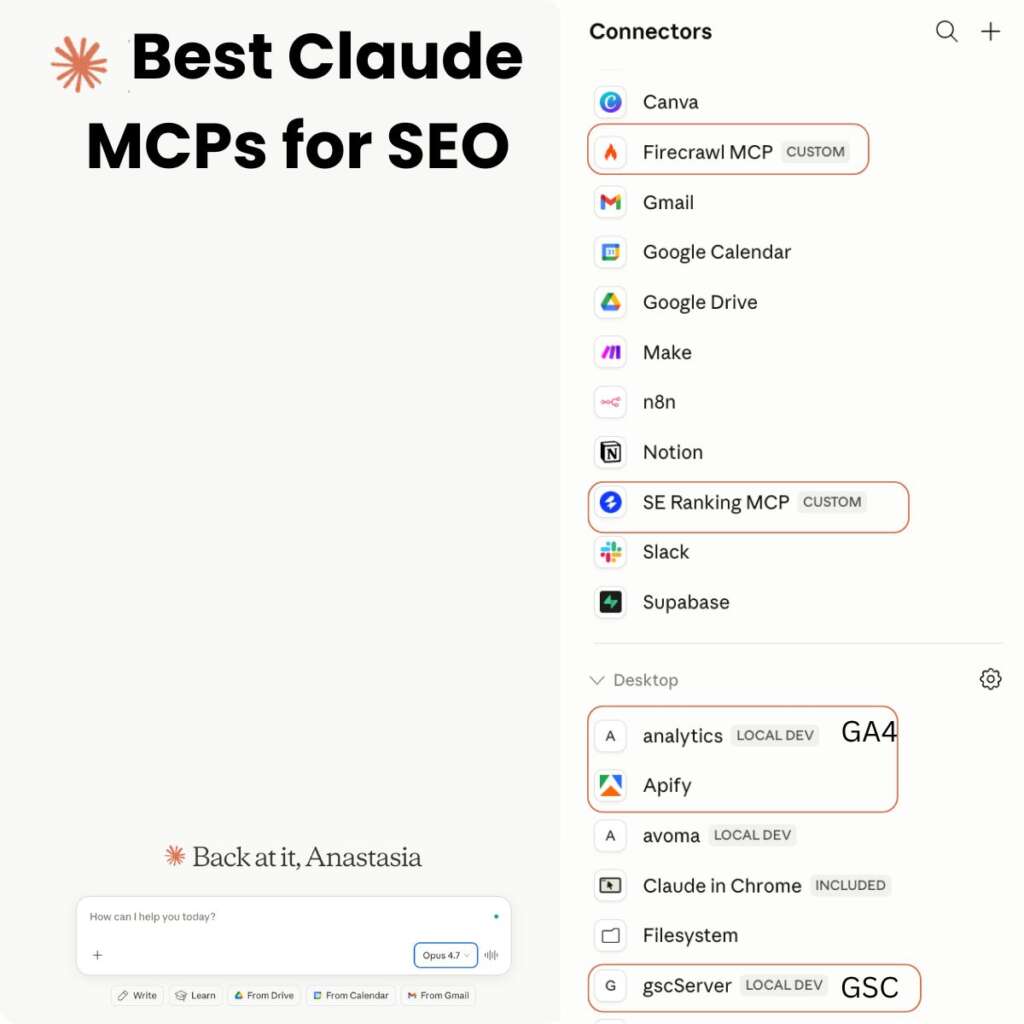
What an MCP connector actually does
Quick definition, because not everyone might be so familiar with the term. MCP (Model Context Protocol) is the standard that lets Claude or ChatGPT talk to an external tool — pull data from it, and sometimes write back to it. A connector is one of those tool integrations.
The practical difference: without a connector, I paste a GSC export into the chat and Claude reads it right and analyses the data per my prompt. With the GSC connector, I just say “compare the last 28 days to the previous period for the blog using GSC and flag the queries that dropped,” and Claude queries the data itself just using my prompt and the connector. No export needed, which is very convenient, especially if you need to merge data from different sources.
That’s the whole point — the connector removes the manual step between pulling the data and the analysis done by AI and your guidance.
Core SEO connectors
Let’s start with the core must-use free tools that give you the most accurate SEO data.
Google Search Console
This is my most-used connector! GSC is what I use for almost all SEO analysis or checks.
What I actually run on it:
Period-over-period comparisons to see the overall performance.
Then I go to the country and page level to understand what pages are bringing organic growth and what should be reviewed and optimized.
Query-to-page relevance checks — pulling rising queries and seeing if there are new content ideas within those queries (if the page currently ranking for them is not the right one).
Quick “which queries are we ranking 5–15 for” pulls to find the optimization opportunities that don’t need a brand-new page, just a better one.
Optimizing content & adding relevant internal linking using the query data.
And much more.
Because Claude reads GSC directly, I can ask follow-up questions and add other data sources to go further.
And as for GSC, I tried and used two MCPs by the SEO community – Suganthan Mohanadasan and Amin Foroutan – both work.
The easiest way to connect GSC is probably to follow this video guide by Amin Foroutan.
GA4
GSC gives you the granular SEO data, while GA4 gives you the context – what your traffic channels are, details on each, landing pages and user engagement, etc.
I use the GA4 connector mostly for analysis per organic source (Google, Bing, etc.) and traffic from AI engines – overall, by country, by landing page. I also see if users are engaging with the pages.
So, there are tons of useful data – the only thing is that the setup is not the easiest one.
So, GA has an official MCP; here is the documentation.
Briefly, here are the steps:
In console.cloud.google.com, you create a project and enable the Google Analytics API. You create a key and give Claude access to that key. You also ask Claude for additional installations if needed and add the GA4 snippet into the Claude config JSON.
I’m going to create a separate guide on this topic as I haven’t seen really easy ones to follow.
SE Ranking
SE Ranking is an SEO tool that gives you accurate rankings & AI visibility data as well as SERP analysis, keyword & domain data. So, I most often use it for getting rankings reports in Google and AI visibility, keyword data for content-related tasks or research, as well as SERP data for cluster analysis.
For example, I have a scheduled SEO performance report with rankings (top-10 movers for target keywords, top 3/top 10 buckets, shifts across the projects combined with AI visibility data like brand in the top 3 mentions per AI engine). I add GSC and GA4 data on top.
The setup is easy: you just add a custom connector (a link) and insert your API key.
Ahrefs
Ahrefs is also an SEO tool that is known for its strong backlink data. I can use it for getting DR as a benchmark metric, domain analysis, and backlink reports. It’s great to have both tools if you have the budget, as SE Ranking is best for rankings, while Ahrefs is a top tool for backlinks.
One of the tasks I have with Ahrefs is getting a scheduled weekly report by new top backlinks with DR, traffic and backlink details (anchor) sorted by DR.
You can find Ahrefs in the Connectors tab and just click on it.
Screaming Frog
The newest addition to my stack — the official Screaming Frog MCP just arrived, and a site crawler is exactly the kind of data I always wanted Claude to read directly.
With Screaming Frog, I can have Claude crawl a section and surface the issues that matter — broken internal links, redirect chains, missing or duplicate titles, thin pages, orphaned URLs. Pair the crawl with GSC data and you can prioritise: don’t just list every technical issue, fix the ones on pages that actually earn clicks first.
You can also get data by URL, which is useful for deep on-page analysis.
For the setup, you need to have the latest version, download the extension and add it to Claude desktop Settings -> Extensions.
Scraping connectors
Firecrawl
Firecrawl is my website-content scraper. When I need the actual text of a page — a competitor article, a SERP result — Firecrawl pulls clean, readable content that Claude can analyse straight away. I use it constantly, mostly for on-page analysis and content optimization when I need full page content, and also for content audits when I need additional data like publication date.
If you use it for on-page analysis or briefs occasionally, the free tier should be fine. But if you run content audits often or you need to scrape page content every day, you would probably need a paid version.
Apify
Apify is an additional scraper on top of Firecrawl. My main use case is competitor monitoring — scraping LinkedIn company pages and key employee profiles to see what competitors are publishing and promoting.
I run it on a schedule daily, and the output feeds a daily competitor digest. It’s flexible enough for plenty of other scraping jobs too, but the LinkedIn monitoring is what earns its place for me.
The free tier is enough for me.
Day-to-day management connectors
SEO isn’t only keywords and crawls — if you work in-house with a bigger team, a lot of your week is communication and coordination. These connectors are why Claude replaced a handful of separate tabs.
They are all very easy to connect – do it from the ‘Connectors’ tab.
Gmail, Google Calendar & Drive
The Google trio keeps Claude aware of my actual day. It can pull context from email threads, check what’s on my calendar, and read or reference docs in Drive — so when I ask for a recap or a draft, it’s working from real context, not a blank slate.
I would really love to see a Google Sheets connector as this is my main tool for work, but unfortunately, it’s not there yet (only Excel).
Slack
This is the connector that surprised me with how much it saves. I use it to recap my day or week from the channels that matter, pull out action items I’d otherwise miss, turn messages into Linear tasks.
I have separate channels for automated reports sent by Claude, like the SEO performance report or competitor monitoring, so as not to spam regular chats.
Notion
Notion is my knowledge base and database. Claude reads from it for context — brand guidelines, processes, project notes — and I use it as the source of truth behind a lot of my skills. When a workflow needs documented rules to follow, they live in Notion and Claude pulls them in.
I can also easily push something to Notion – like a content plan or list of pages with additional data. The connection works really well.
Linear
Linear is my task manager, and the connector lets Claude create and update issues directly. Most of my tasks now get created from inside a conversation — I spot something in Slack or just have the plan based on the analysis, and it becomes a properly formatted Linear issue with the right context attached, instead of a vague note I write to myself.
The one that handles the small stuff
Claude in Chrome
Claude in Chrome is for the quick, in-the-moment jobs — pulling data from a tab I already have open, reading a page behind a login that a scraper can’t reach, grabbing something off a dashboard. It’s not where I do heavy analysis, but it closes the gap for all the little “just get me what’s on this screen” tasks.
For example, it takes some data from my internal dashboards and gives me the calculations.
Or you can get data from LinkedIn.
And other help you might need in Chrome, where you need to click filters and copy some things.
Skills are the other half of the equation
Here’s the part people miss when they get excited about connectors: the MCP layer gives Claude access, but skills are where the real differentiation lives. A connector lets Claude read GSC. A skill tells it how I want a GSC analysis done — which periods to compare, which filters to apply, what to flag, how to present it.
MCP connectors plus skills give you something closer to a teammate who already knows how you work and has the needed data.
Where to start
If you’re building this stack from scratch, I wouldn’t connect everything at once. Start with the data source you touch most — for me that’s GSC — get used to working with it, then layer in the rest.
Add SE Ranking or Ahrefs when you’re doing keyword research, competitive or backlink work, bring in Screaming Frog when technical SEO is the priority, and wire up Slack, Notion and Linear (or Jira) once you want Claude handling coordination as well as the SEO tasks.
GA4 is the most complicated connector to connect, but it’s also a must-have, so it’s worth spending the extra time.